
How scaled products actually deploy frontend and backend
Deploying looks simple until real users and real money are on the line. Here is how big products really deploy their frontend and backend, and why one small git tag sits at the centre of it all.
Deployment looks simple from the outside. Push your code to the main branch, wait a minute, and the site is live.
That is true for a side project. It stops being true the moment real users and real money depend on it.
At that scale, deploying turns into its own job, with its own rules. This post is how big products really deploy their frontend and backend, and why one small thing, a git tag, sits at the center of it all.
What a tag actually is#
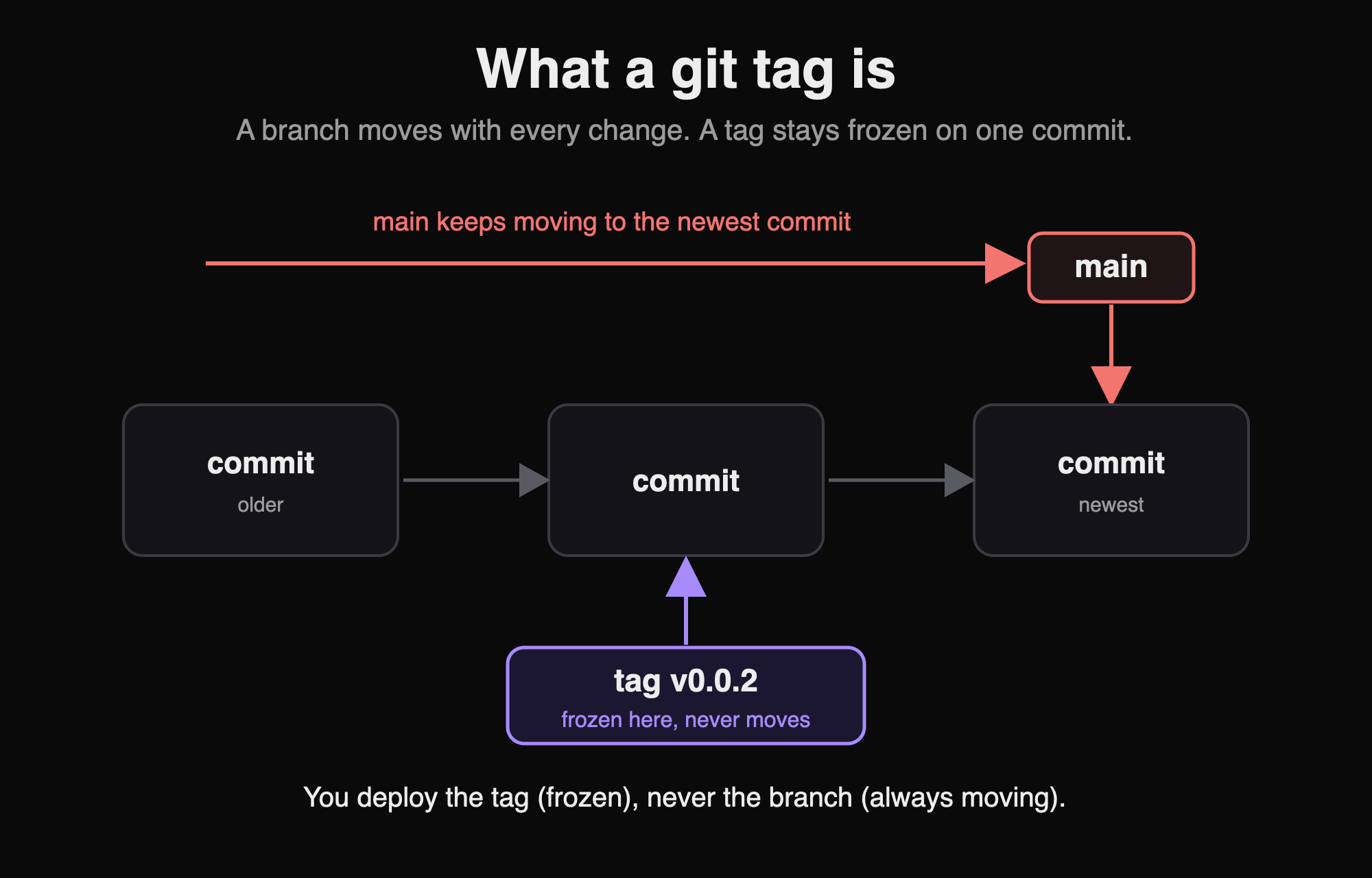
A git tag is a permanent name attached to one exact commit. Think of it as a bookmark that never moves.
Your main branch keeps moving forward as people merge their work into it. (A merge just means joining your finished change into the shared code.) A tag does not move. You create v0.0.2 once, and it always points to that exact state of the code. Forever.
Real teams do not deploy a branch. They deploy a tag. A branch keeps changing. A tag never changes. That one difference is what makes everything else work.
Frontend: easy until it grows#
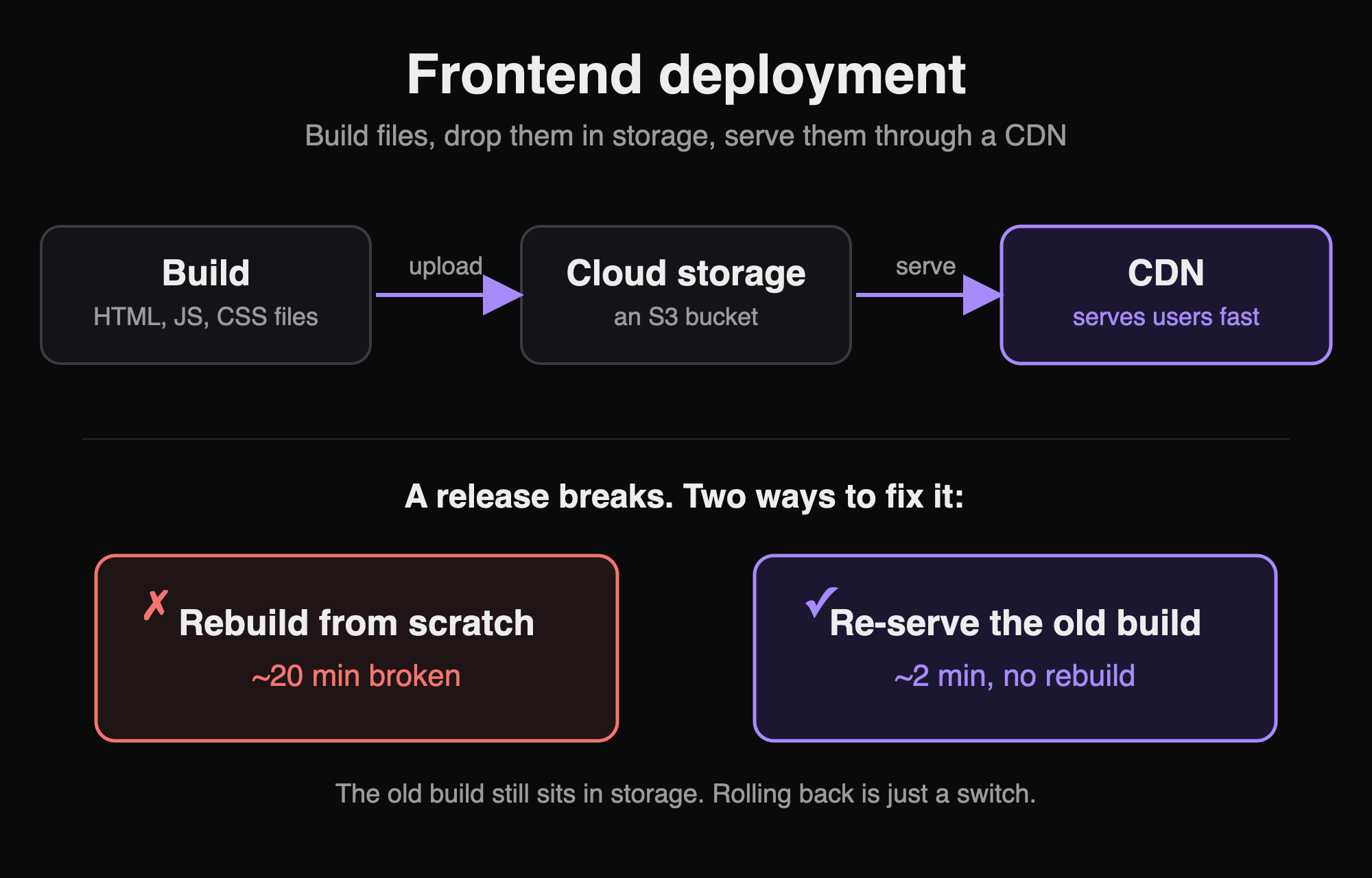
The frontend is the easiest part to deploy, because it is not a running program. When you build a frontend, it turns into plain files: HTML, JS, and CSS. That is all the browser needs.
So deploying it is really three small steps:
Build the app into those files.
Upload the files to cloud storage (an object store like Amazon S3, basically a folder in the cloud).
Put a CDN in front of that storage. A CDN is a group of servers spread around the world, so each user gets the files from a server close to them.
That is the whole job. No server to keep alive, no containers. Just files in storage, served fast by a CDN. To ship an update, you upload the new files and tell the CDN to refresh, so people stop seeing the old cached copy.
It gets harder in the setup that most real companies use: a monorepo. A monorepo is one big repository that holds many products together. Each product has its own settings and its own version. Some packages are shared between them.
Now deployment is not one job. It is many. There are automation scripts, one for each product. Each script knows how to build and release just that product. For one product, the steps look like this:
Build that product.
Create a tag for its new version.
Release only that product.
So if the checkout product is at v0.0.1, you create v0.0.2 and release only checkout. Every other product in the repo stays exactly where it was. This is the whole reason big teams use a monorepo. One repo, but each product is released separately, whenever it is ready.
One more thing, because it surprises people coming from side projects. In a real product company, merging your code does not put it live. There is no "merge and it goes live" step. A person starts the release on purpose, and for production that person is usually the tech lead. Going live is a decision someone makes on purpose, not an automatic result of merging code. The tech lead picks the moment, confirms it is the right build, and starts the deploy. That control is the whole point.
But here is a fair question. Why make a tag for a frontend at all? You can always build it again and serve the new files. So why freeze anything?
Speed.
A full build of a large frontend can take 11 to 15 minutes, sometimes more. Now imagine something breaks in production (the live version your users actually use). If your only option is to build again, your users stay on the broken version for that whole time. That is easily 20 minutes, once you add the time to notice the problem, fix it, and deploy.
Tags fix this. Every past release is still a finished set of files sitting in your storage. So rolling back (going back to an older version) is not a new build. It is just a switch. You point the CDN back at the previous release's files and clear its cache. This turns 20 minutes of broken production into 2 minutes, because the working files are already there. You only change which ones get served.
And no, the answer is not "just edit the build files on the server by hand." That is not how products are deployed. The whole point is that a release is frozen. You switch between releases. You do not open one up and change it while it is live.
Backend: when the deploy is a git change#
The backend is not files. It is a living program that runs all the time, answering requests. So it cannot just sit in storage. It has to run somewhere.
It runs inside a container: a sealed box that holds the app and everything it needs to run. Containers are managed by an orchestrator (the common one is Kubernetes), which keeps them running, restarts them when they crash, and adds more copies when traffic grows.
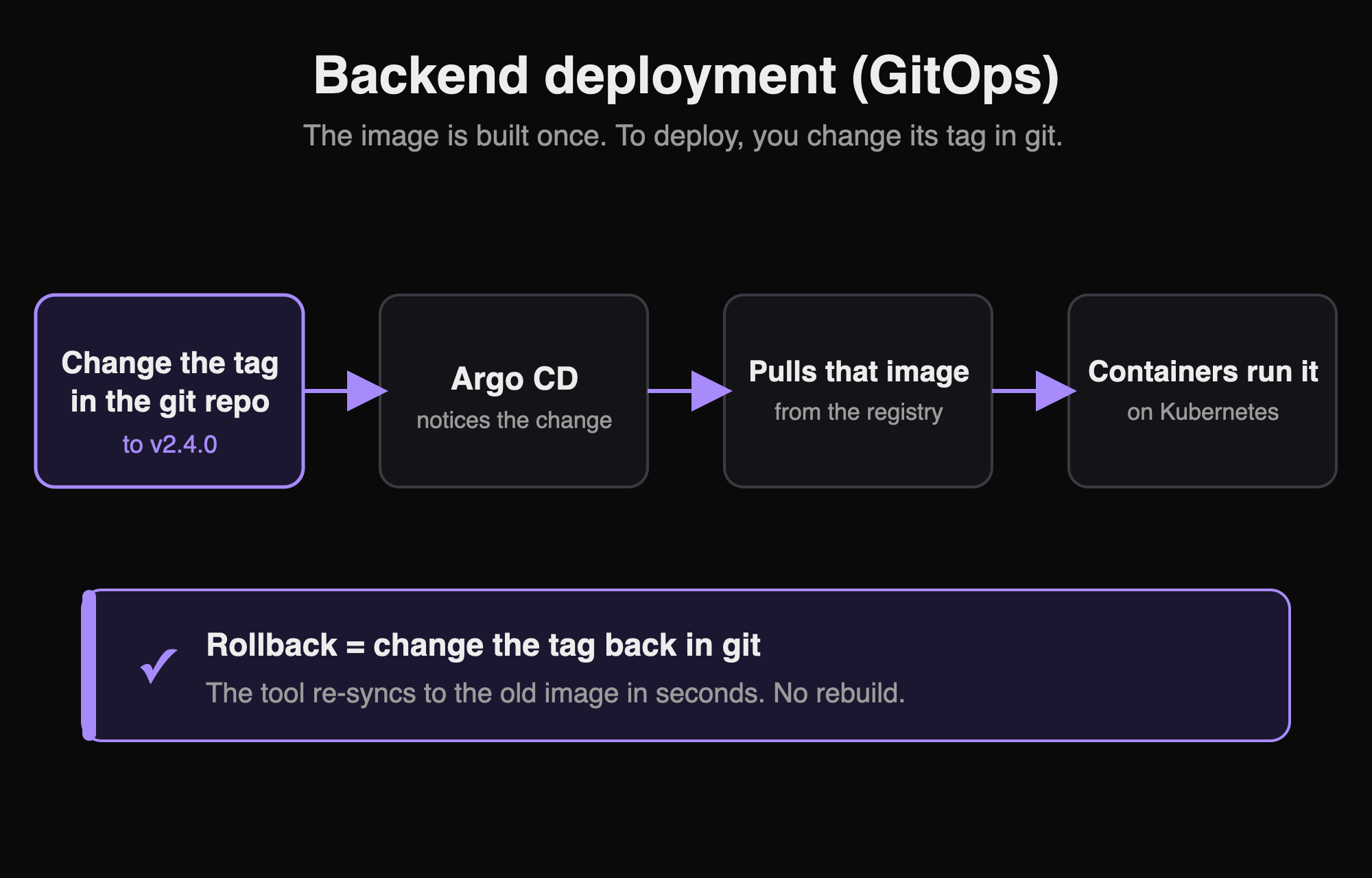
The frozen version here is a container image. You build your code into an image (a snapshot of the app and its setup), push it to a registry (storage for images, like a folder for containers), and tag it. Same idea as before, just for the backend: tag v2.4.0 always means those exact bytes. You build it once.
Now the interesting part. You do not push the new version onto the servers by hand. There is a second, separate git repo that only describes what should be running: which image, which tag, which settings. To deploy, you change the tag in that repo, and a tool watches the repo and makes the servers match it. The deploy becomes a small change in git. This approach has a name, GitOps, and a common tool for it is Argo CD.
This is where build once, promote becomes real. The same image moves from the testing copy to production by changing which environment points at it. Nothing is rebuilt in between. Rolling back is a git change too: set the tag back to the last good one, and the tool re-points the servers to that older image in seconds.
Smaller teams keep it simple#
All of this is for products at scale. Most teams are not there, and they should not pretend to be.
A small team often deploys the frontend with a service like Vercel or Netlify. You connect your git repo, and every time you push, they build it and put it live for you. No storage buckets, no CDN to set up, no release workflow. The platform handles all of it.
The backend can be just as simple. The code lives on one server. To update it, you log in, pull the latest code, and restart the app by hand. One server, one manual step. That is the whole deployment.
And that is completely fine. The right amount of process is the amount your scale actually needs. A two-person team with a few hundred users does not need GitOps, tagged images, and a separate deployment repo. That machinery solves problems they do not have yet. Adding it early would only slow them down.
The tag-based, build-once way earns its place when more is on the line: many engineers, many users, and real money lost if production breaks. Until then, push-to-deploy and a manual pull are not lazy shortcuts. They are the right call.
So why use tags at all?#
This part is easy to skip, so let me say it clearly. Tags are not extra paperwork. Each one gives you something you will really want on the day things go wrong.
Rollback is instant. Like you just saw, you switch production back to the previous tag's build instead of building again. No panic, no waiting.
You always know what is live. "Production is on
v0.0.2" is a fact you can check, not a guess.You can repeat a release. The tag freezes the code, so you can build it again next month and get the exact same result.
Merging and releasing become two separate things. Engineers keep merging into main all day. Releasing becomes a clear, planned choice. It does not happen by accident just because someone's code got merged.
None of this is meant to slow you down. Each step is there because someone, somewhere, faced a painful problem without it.
What I see differently now#
I used to think deployment was just the last, boring step after the real work was done. Press the button and go home.
Now I see it as part of the design. A release is a named, frozen point that you can always go back to. That way of thinking is most of the difference between a side project and software that a company depends on.
If you are just starting out, you do not need to memorize anyone's pipeline. You need one idea. Stop thinking about branches that keep changing. Start thinking about tags that never change.
Keep reading